Say who is making the story, add your child, pick a ready-made story and choose what you want made: a finished picture book in two steps.
zeStory ·Oct 4, 2026·5 min read
Express is the quickest way to a finished book. It is what opens when you press Create a story, and it has two steps, named at the top of the page: Who is the story for? and What is the story about?. The plot, the art style, the mood and the length come with the story you pick, so a few taps are enough.
1. Who's making this story?
The first card is about you, the grown-up making the book.
Type your first name under Your name, then tap who you are to the children under You are their….
When you are signed in, you can also record your own voice here, under Voice. It can then read your books aloud and speak for you whenever you are in a story. The recording works as it does for any character (see below).
Press Continue.
Your name is remembered on this device, and your account keeps you as a grown-up of the family, so your next story already knows who you are.
2. Photos, recordings and your privacy
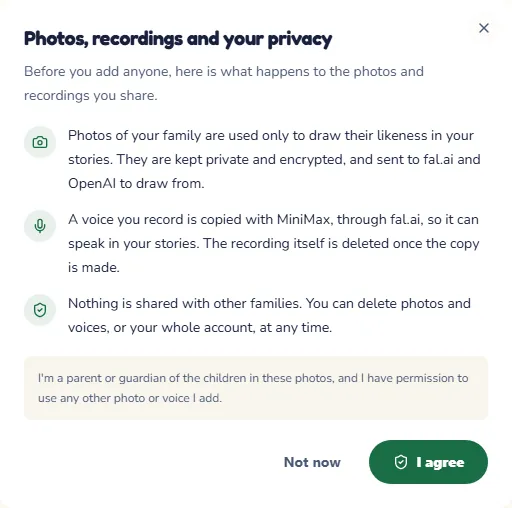
Before anyone is added, a pop-up explains what happens to the photos and recordings you share:
photos are used only to draw your family in your stories, and are kept private and encrypted;
a voice you record is used only to speak in your stories, and the recording itself is deleted once the voice is made;
nothing is shared with other families, and you can delete photos, voices or your whole account at any time.
Press I agree to confirm that you are a parent or guardian of the children in the photos. The cast opens only once you have agreed; closes the pop-up without agreeing. Your browser asks for the camera or the microphone separately, and only when you press a button that needs one.
Now add the people in the story. Your own card folds into one line that says who made the book; if you are in the story too, press Add me to the story on it.
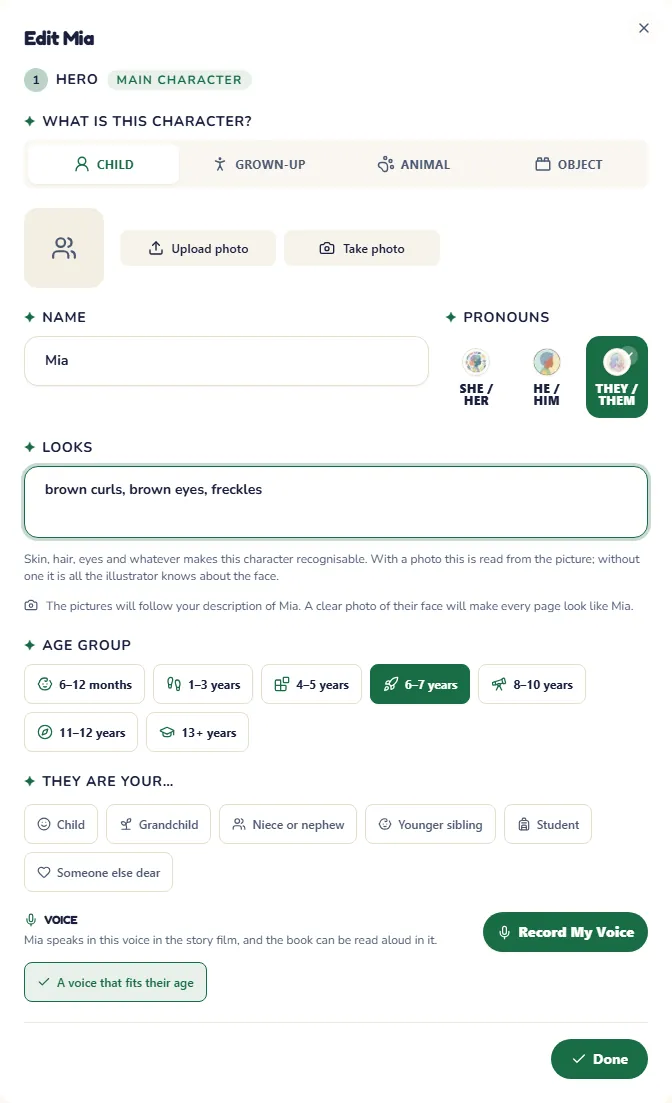
On the first character's line, press Add details. The character opens in a pop-up over the page.
Choose what the character is (a child, a grown-up, an animal or an object), type the name and choose the Age group: the age sets the words and the length of the sentences.
To make the pictures look like them, add a photo with Upload photo or Take photo. The photo stays private to your family's stories. Without a photo, describe the face under Looks (skin, hair, eyes), so the illustrator knows who to draw.
Under Voice, choose how the character sounds in the story's film: a voice that fits their age is chosen for you, or tap one of your family's voices. For a voice of your own, press Record My Voice, read the short passage aloud, confirm that it is your own voice and press Make the voice. The price in coins is shown before anything is spent, and the voice is ready in about a minute. Recording a voice needs an account; objects have no voice.
Press Done.
A story holds up to four characters. When you are signed in, the people you added before wait under From your family: tap one to bring them in with their photo, looks and voice, or press Add someone new. Without an account, press Add a character. To change someone later, press the pencil on their line. When everyone is there, press Next: Story Details.
4. Pick a story
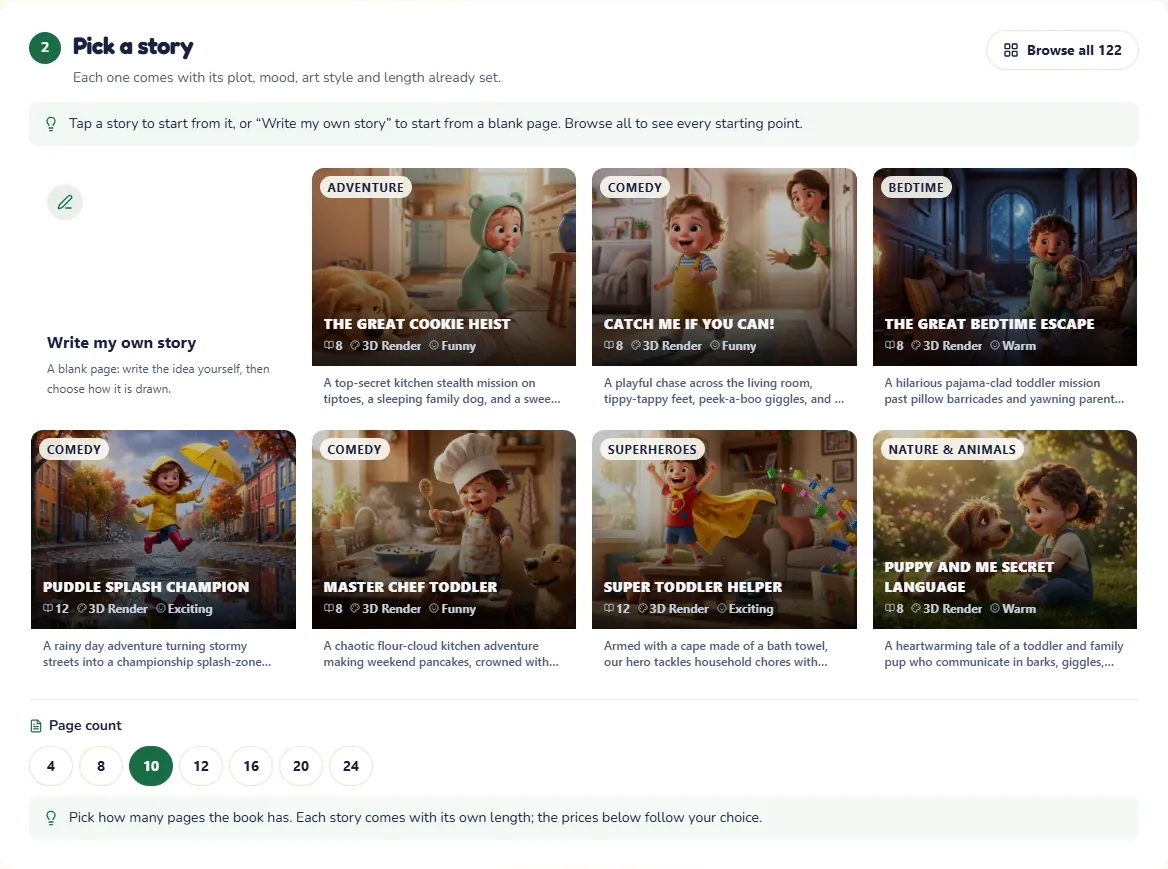
The second step opens with the stories. Every card is a complete story, with its plot, mood, art style and length already set: tap one and it is yours.
Browse all … opens every story in a window over the page, with a search box and categories. Tap a story to see it, then press Use this template.
Write my own story starts from a blank page: write your idea under Make it yours (optional), where you can also add a lesson, a place, a companion and an object that matters.
Under the stories, choose the Page count. Under Pick a look, the story's own look is already picked: tap another one, or press Browse all to see them all.
The stories follow the days families care about: a first day at school, a birthday, a new baby, a visit to the grandparents, Christmas and many more.
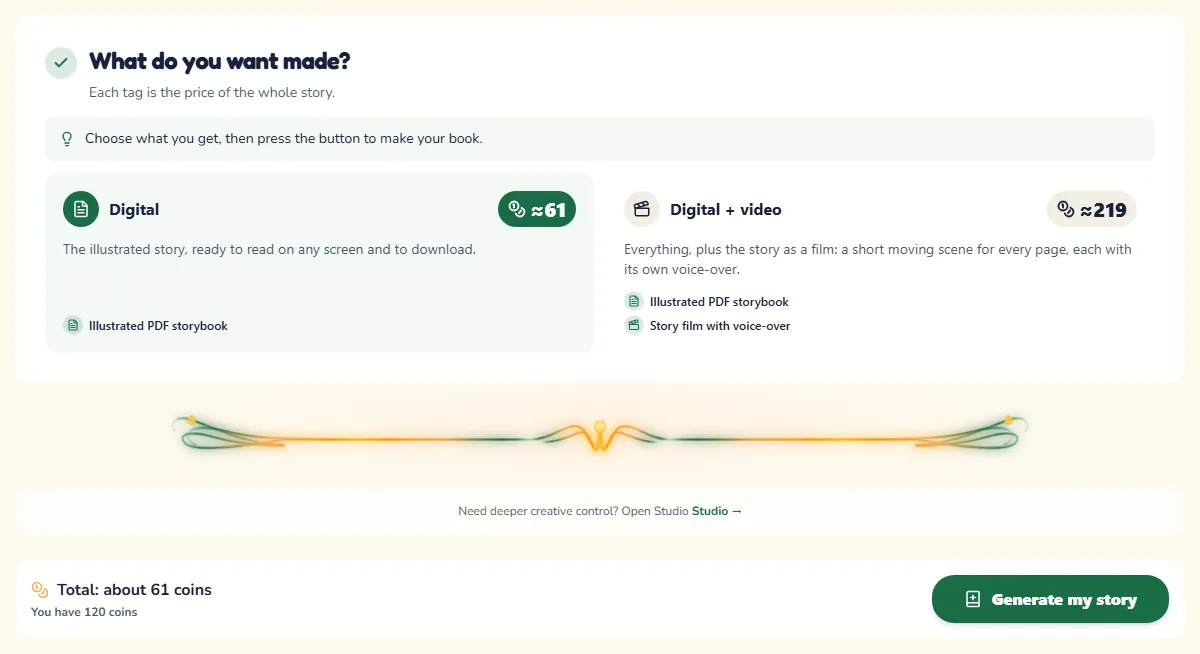
5. What do you want made?
Choose what you want made. Each tag is the price of the whole story, in coins.
Digital: the illustrated book, to read on any screen and to download.
Digital + print-ready files: the same book with every picture also made at print size, in press-ready files. This is not a printed book: you can order a printed copy later, from your story's page.
Digital + print-ready files + video: everything above, plus the story as a film, with a short moving scene for every page in which the characters speak their lines.
A new account comes with free coins for a first story. While they are there, a green box offers it: press Use my free story and you get a 6-page illustrated book at Standard quality, without narration. Video, narration and printed copies cost more coins.
The bar at the bottom shows the total. Press Generate my story; the button also shows the price. If you are not signed in yet, you are asked to sign in first, and everything you chose comes with you.
What happens next
The story usually takes about a minute to write. It opens as soon as it is ready, and the pictures arrive page by page. From your story you can read it, change the words or a picture, share it with the family and order a printed copy.
If you do not have enough coins, the button says how many more you need and takes you to the coin shop. Your story waits for you, and you come straight back to it.
When you want more control
Want to choose the art and the genre yourself, or the tone, the language, the narrator and the cover? Use Studio mode. The switch at the top of the creator moves between Express and Studio, and your choices come along.
Turn your next idea into a personalized storybook
Create consistent characters, branching story paths, and print-ready books with governed creative tools.